File
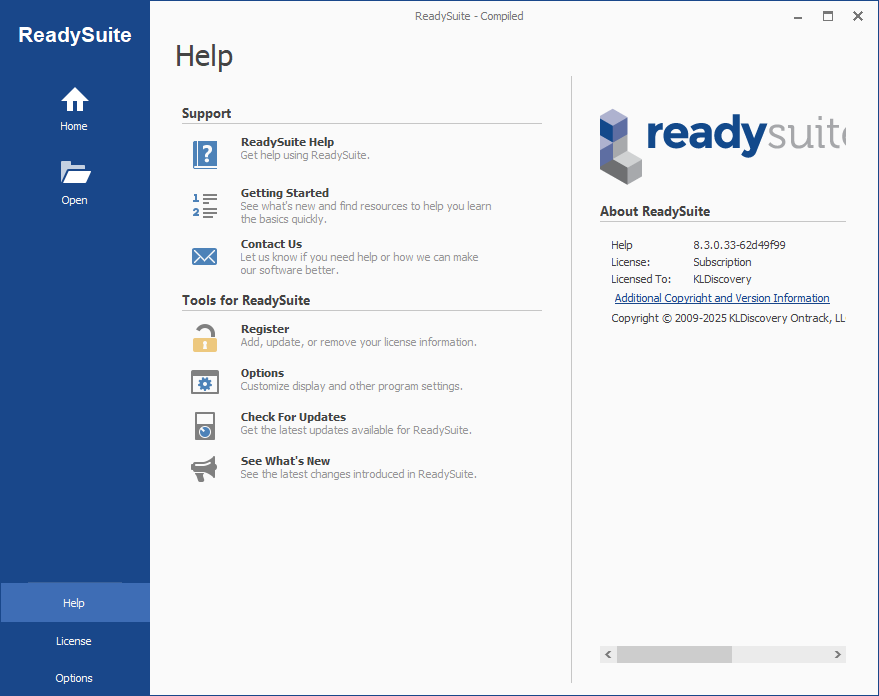
Click File in the ReadySuite ribbon to access the following commands, as well as links to support, ReadySuite tools, and version, license, and copyright information:
- Save: Saves the current ReadySuite file or project.
- Save As: Opens the Save As dialog box to save the current ReadySuite file or project at another location, with a different file name, or as a different file type.
- Open: Opens the Open dialog box to open a file in ReadySuite.
- Close: Removes the current project from ReadySuite.
- Help: Contains the following commands:
Support
- ReadySuite Help: Opens the online ReadySuite Help.
- Getting Started: Opens the online ReadySuite Help at the Getting Started topic.
- Contact Us: Opens the Contact Us page of the Compiled website.
Tools for ReadySuite
- Register: Opens the License Manager dialog box.
- Options: Opens the ReadySuite Options dialog box.
- Check For Updates: Verifies that most current version or ReadySuite is running.
- See What's New: Opens the ReadySuite Updates dialog box.
About ReadySuite
- Version:
- Options: Opens the ReadySuite Options dialog box.
- Check For Updates: Verifies that most current version or ReadySuite is running.
- See What's New: Opens the ReadySuite Updates dialog box.
- Recent: Displays Recent Projects (history of projects opened in ReadySuite) loaded and Recent Places (history of files imported to ReadySuite).
- License: Opens the License Manager dialog box.
- Options: Opens the ReadySuite Options dialog box.