Licensing Service (ReadyLicense)
ReadyLicense is a licensing application separate from ReadySuite intended for use when five or more concurrent licenses are required. This licensing service only needs to be setup on a single, centralized server that can be accessed by all other machines running ReadySuite through the License Manager.
This optional license add-on is only used when you have purchased the Network variant of ReadySuite. If you have the Machine/Workstation license edition of ReadySuite, you do not need to setup this licensing component.
To request the ReadyLicense licensing service installer, e-mail readysuite@ediscovery.com and a download link will be sent to you.
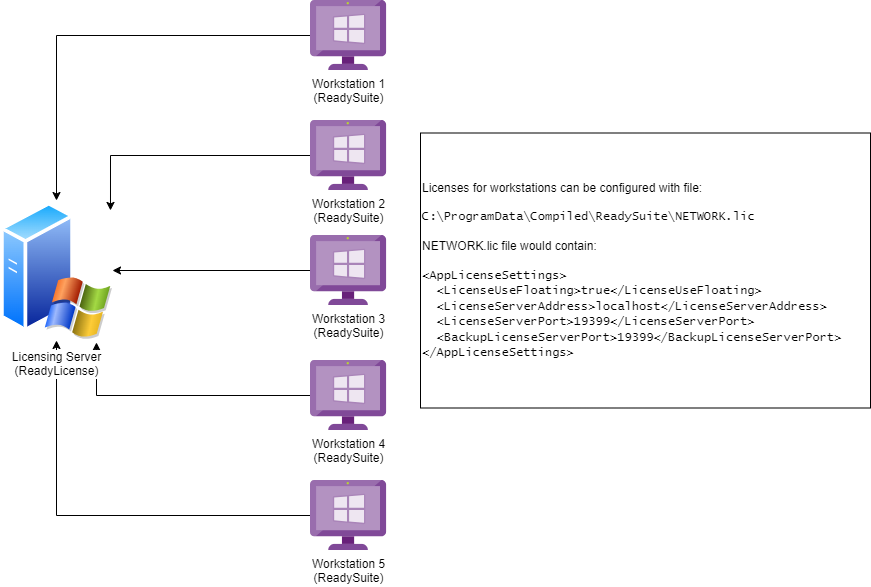
Once installed, open ‘ReadyLicense’ with the Start menu shortcut, and activate the above serial. Go to Register->Install Serial. The default port is 19399 and that port should allow inbound connections from the firewall on this machine.
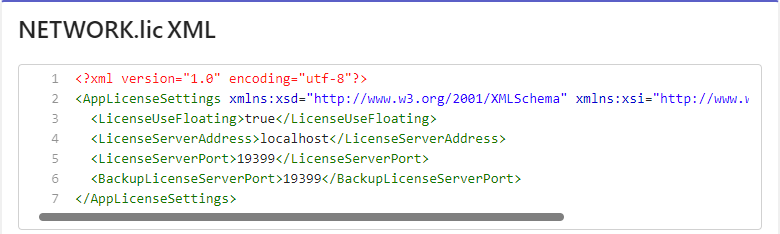
NETWORK.lic
ReadySuite stores the network license configuration, by default, at the machine level using the NETWORK.lic file (ProgramData > Compiled > ReadySuite). This file can be added to the single machine running the licensing service (ReadyLicense) to activate that machine with the license settings. ReadySuite creates this file if you activate it within the ReadySuite UI
Network administrators can open the NETWORK.lic file and change the LicenseServerAddress and License ServerPort as desired to deploy a new license configuration file.