Updating the License
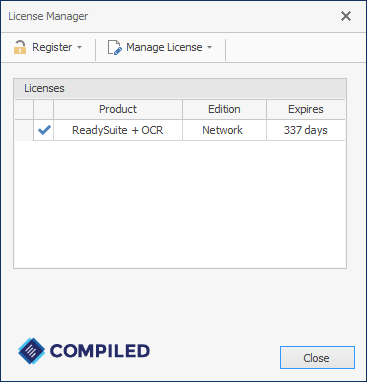
With internet access, you can update the ReadyLicense license using the License Manager.
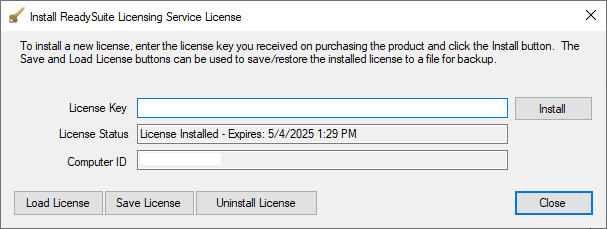
If you do not have internet access on the machine running ReadyLicense, you can request an offline license from ReadySuite Support and update the license using the Install ReadySuite Licensing Service License dialog box.
Note: You must restart the licensing service for an updated license to be applied.
To update the license (internet available)
- On the Start menu, select Compiled > ReadyLicense.
- On the License Manger dialog box, do one of the following:
- Click Manage License > Update License.
- Right-click the license you want updated and select Update License.
To update the license (internet unavailable)
- On the Start menu, select Compiled > ReadyLicense.
- On the License Manger dialog box, do one of the following:
- Click Manage License > Modify.
- Right-click the license you want updated and select Modify.
- On the Install Ready Suite Licensing Service License dialog box, click Load License.
- Enter the offline License Key provided by ReadySuite Support.
- Restart the licensing service (For more information, see Troubleshooting ReadyLicense.)
Note: Alternatively, you can use our offline license site to activate the license file:
https://authentication.compiled.com/AuthenticateFile.aspx