Process
Note: The Process tab is not present in chat projects.
Click Process in the ReadySuite ribbon to access the following commands:
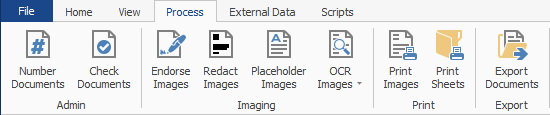
Admin
- Number Documents: Opens the Number Documents wizard.
- Check Documents: Opens the Check Resources wizard.
Imaging
- Endorse Images: Opens the Endorse Images wizard.
- Redact Images: Opens the Redact Images wizard.
- Placeholder Images: Opens the Placeholder Images wizard.
- OCR Images:
- Create Text Files: Opens the OCR Documents wizard.
- Create PDF Files: Opens the Create Searchable PDFs wizard.
- Print Images: Opens the Print Documents wizard.
- Print Sheets: Opens the Print Cover Sheets wizard.
Export
- Export Documents: Opens the Export Documents wizard.